


Data Analytics course
Become Job-Ready in Data Analytics with Excel, SQL & Tableau
Enrol in our Data Analytics course to master Excel, Tableau, and SQL, and make data-driven decisions to elevate your career today.
Pay little to no cash with government subsidies


I thoroughly enjoyed learning how to analyse datasets using SQL & visualise data with Tableau. Looking forward to apply these skills in my work.
Evangeline, Data Analytics Course Alumni

Trusted by 50,000+ learners


$760.50 $1,950
Claimable with SFC and PSEA
Online / In-Person
Intakes Available
21.5 Hours Total
7 Lessons + 1 Assessment
Flexible Schedule
Weekdays or Weekends Available
Course Overview
Learn Data Analytics with Vertical Institute
The WSQ Data Analytics Bootcamp is a 3-day, 21-hour, hands-on programme that equips learners with practical, job-ready data analytics skills using Excel, SQL and Tableau. Learners progress from foundational data handling in Excel, through database querying with SQL, to building interactive dashboards and data visualisations in Tableau, culminating in a capstone project applying these skills to a real-world business dataset.
Key Learning Outcomes
Upon completing this course, learners will be able to:
- Clean and prepare data in Excel: Apply Excel formulas, functions, and data-cleaning techniques to prepare raw data for analysis.
- Understand relational databases: Explain relational database concepts and write basic SQL queries to retrieve structured data.
- Write SQL queries to summarise data: Use SELECT, WHERE, JOIN, and aggregate functions to summarise and interpret data.
- Design effective dashboards: Select suitable information displays and apply data visualisation principles to build dashboards that communicate clearly.
- Build visualisations in Tableau: Connect data sources in Tableau and choose chart types suited to the data and business context.
- Create interactive Tableau dashboards: Build dashboards with filters and actions, and communicate insights clearly through data storytelling.
- Apply your skills to a real project: Complete a capstone project using Tableau and analytical skills, and communicate findings including the limitations of the analysis.
Software and tools used




who is this course for
Is Data Analytics Course Right for Me?
This course is designed for working professionals who want to build practical data analytics skills that can be applied immediately in the workplace. It’s an excellent choice for individuals looking to transition into data-related roles or develop in-demand skills using Excel, SQL, and Tableau. Whether you’re new to analytics or want hands-on experience with industry tools, you’ll complete the course with practical knowledge and a portfolio-ready capstone project.


Want to work with data but don't know where to start?
Breaking into data analytics can feel overwhelming when you're expected to know multiple tools. This bootcamp guides you step by step through Excel, SQL, and Tableau, giving you the practical skills employers are looking for.
Still spending hours creating reports manually?
Manual reporting can be slow and prone to errors. Learn how to organise data, write SQL queries, and build interactive dashboards that help you analyse information faster and make better business decisions.
Looking to build a portfolio that demonstrates real analytics skills?
Learning theory isn't enough to stand out. Complete a hands-on capstone project using real business data and leave with practical work that showcases your ability to analyse data and communicate insights confidently.
Course Curriculum
What You’ll Learn in This Course
Covers Excel fundamentals for data analysis — formulas, functions and data cleaning — building the foundation for further analytics work.
Introduces relational database concepts and basic SQL querying to retrieve and work with structured data.
Covers core SQL syntax — SELECT, WHERE, JOIN, aggregate functions and GROUP BY — for querying and summarising data.
Covers data visualisation principles, selecting the right chart types, and the elements of effective dashboard design.
Introduces the Tableau interface, connecting to data sources, and building visualisations with appropriate chart types.
Covers dashboard design, filters and interactive actions in Tableau, plus techniques for communicating insights through data storytelling.
Applies course skills to the capstone project, focusing on communicating findings, insights and analytical limitations to stakeholders.
- Written Assessment: Individually scheduled, open-book assessment of 5 short-answer questions covering data interpretation, information display types, and data visualisation principles..
- Practical Assessment: A self-paced, take-home Tableau project applying visualisation, dashboard-building and storytelling skills to a real dataset, followed by a live presentation to a certified Assessor.
Instructors
Learn From the Best in the Industry

Zane
Director, Generative AI (APAC) - Manulife
Masters in Knowledge Engineering, NUS BEng in Aerospace Engineering, NTU


Lindsay
Data Analytics Manager - Kape Technologies
Bachelor’s in Mathematical Science Nanyang Technological University


Stan
Lead Data Scientist - Citi
Master’s in Computing National University of Singapore

Certification
Earn Your Data Analytics Course Certificates

Accredited Certification from Vertical Institute and WSQ


You will receive a certificate from Vertical Institute upon successful completion of the course, together with a WSQ Statement of Attainment recognised by employers in Singapore. They can be used to demonstrate your skills to potential employers and expand your professional network.
Student Testimonials
What They Said About Vertical Institute

The course was geared towards complete newcomers. I could follow the teaching, the instructors were very friendly, and I really felt like I learned a lot. When I was putting together the deck for my Capstone Project, I could see all those weeks of learning come to fruition. VI is a place where everyone, regardless of their age or prior education, can come to learn new skills.


Course Fee & Government Subsidies
Pay Little to No Cash with Government Subsidies

SkillsFuture Credits, UTAP and PSEA Claimable
SkillsFuture Credits: All Singaporeans aged 25 years old and above can use their SkillsFuture Credits to fully offset the remaining fees.
UTAP Funding: In addition, NTUC members can utilise UTAP to offset up to 50% of remaining fees (capped at $500 per year).
PSEA: All Singaporeans aged 21 – 31 may use their Post-Secondary Education Account (PSEA) to offset remaining fees.

Looking to train your team? offset up to 90% of training costs with SFEC
Have questions? Read FAQs or Contact Us.
Upcoming Course Schedules
Choose a Schedule That Works for You

WSQ Data Analytics Bootcamp
TGS-2026062294
 Method: Online / In-Person
 Duration: 21.5 Hours Total
 Lessons: 7 Lessons + 1 Assessment
Chosen by 50,000+ learners
Join the WSQ Data Analytics Bootcamp Today
Ready to Turn Data into Business Insights?
Develop practical, job-ready data analytics skills with Excel, SQL, and Tableau in this hands-on bootcamp. Gain real-world experience, complete a portfolio-ready capstone project, and build the confidence to make data-driven decisions in any industry.









Frequently Asked Questions
How do I secure my seat in the Data Analytics Course?
To reserve your place, pay the S$10.90 registration fee (incl. GST) when you sign up. This holds your seat while our student services team contacts you within 24 hours to guide you through funding applications and payment arrangements. In many cases, eligible learners pay little to nothing out of pocket after subsidies.
Is the S$10.90 registration fee refundable?
No. The S$10.90 registration fee is strictly non-refundable under all circumstances.
What funding subsidies are available for this Data Analytics course in Singapore?
Eligible NTUC members may utilise UTAP funding to offset 50% of the remaining unfunded course fees, capped at up to $500 per year. Singapore Citizens aged 21 to 31 may also use their Post-Secondary Education Account (PSEA) to further offset eligible course fees.
Funding approval is subject to the eligibility criteria and requirements set by the relevant authorities. Vertical Institute does not guarantee funding approval and is not liable for any rejections, delays, or funding clawbacks
Can I use SkillsFuture Credit and UTAP at the same time?
Yes. You can combine SkillsFuture Credit and UTAP to further reduce your out-of-pocket costs. UTAP must be applied after SkillsFuture Credit has been applied. UTAP claims are submitted after course completion via the NTUC portal.
Am I eligible for SSG funding support?
To qualify for SSG funding, you must be at least 21 years old, a Singapore Citizen or PR, achieve at least 75% attendance (minimum 6 out of 7 lessons), and pass the final assessment. Visit the SkillsFuture Singapore website for the full eligibility criteria.
What is the refund and withdrawal policy?
|
Timing of Withdrawal |
Refund |
|
>14 days before course start |
100% refund (excluding $10.90 fee) |
|
7–14 days before |
50% refund (excluding $10.90 fee) |
|
<7 days before |
No refund |
|
After course starts |
No refund |
An administrative fee of $15 applies to all approved withdrawals.
What softwares do I need to download?
In the data analytics course, you will be learning 3 key industry tools: Excel, SQL and Tableau.
You will need to have your own personal laptop/PC to attend the bootcamp.
The SQL portion will be web-server based, hence no installation is required. You will only need to download Tableau Public, which is free and easy to download.
Your instructional team will guide you step-by-step on the installation process.
What are the completion requirements?
To successfully complete the course, you must:
- Meet the minimum attendance requirement
- Complete all required assessments
- Be graded as “Competent”
What happens if I do not meet attendance or assessment requirements?
If you fail to meet these requirements:
- You will not receive certification
- You may lose funding eligibility
- You will be required to pay the full course fee (unsubsidised amount)
Does Vertical Institute guarantee funding approval?
No. Funding approval is subject to the relevant authorities and your eligibility.
Vertical Institute is not responsible for:
- Funding rejection
- Delays
- Clawbacks
What if I miss a lesson?
You may:
- Attend a makeup class (subject to availability), or
- Watch the recorded session
However, attendance is only counted if you attend the makeup session.
What happens after I complete the course?
Upon successful completion of the course, you will receive a WSQ Statement of Attainment (SOA) and a Certificate of Completion from Vertical Institute, both of which can be used to demonstrate your skills and are recognised by employers in Singapore.
You will also gain lifetime access to the course materials.

 Discuss your career goals
Decide which course is the best for you
Understanding the government subsidies
Discuss your career goals
Decide which course is the best for you
Understanding the government subsidies
Other ways to reach us
🏢 CORPORATE TRAINING
Data Analytics Bootcamp
Enable Smarter Decisions with a Data-Driven Team
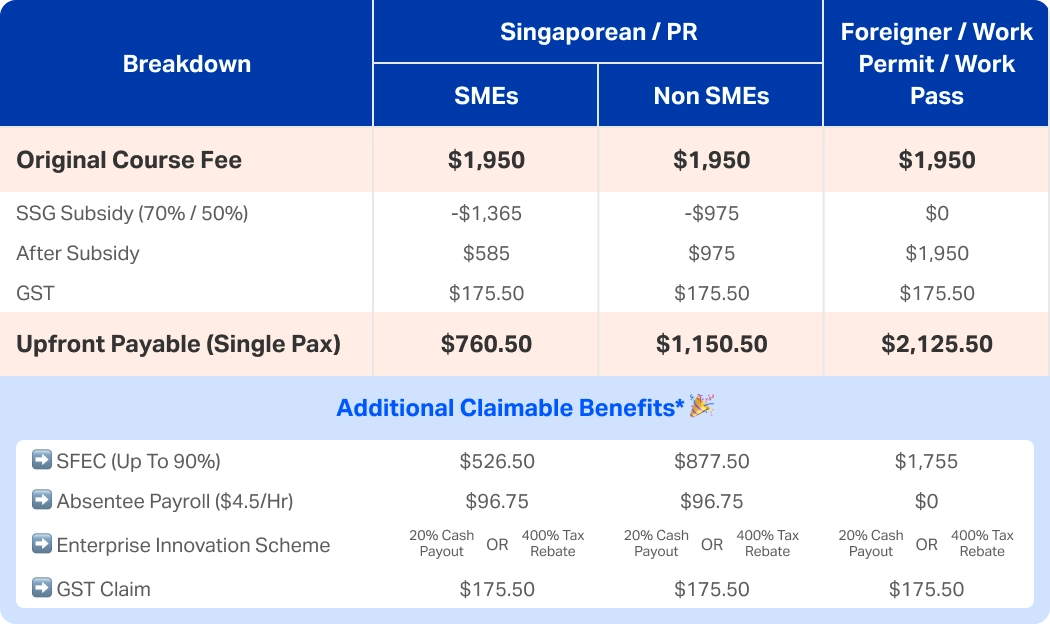
*Subject to business eligibility for each subsidy. Enquire to find out more
Why Data Analytics training for your team matters:

Faster, Data-Driven Decisions
Empower teams to analyse data confidently and make informed business decisions.

Reduced Manual Reporting
Automate dashboards and reporting to save time and reduce errors.

Improved Business Performance
Turn raw data into actionable insights that drive growth and efficiency.

Data Analytics Course Fee & Subsidy Breakdown for Corporate
*Subject to business eligibility for each subsidy. Enquire to find out more

 Chosen by by 50,000+ learners